Booking Booster · AI orchestration layer
Most visitors leave your website without booking.
You never learn why, and you never get them back. Booking Booster is the AI orchestration layer for direct-booking conversion: it reads visitor signals, Whizz AI proposes the right notification, it shows at the right moment on your website and inside your booking engine, and it measures whether it brought additional bookings. You choose which ones go live.
What a hotel gets
More revenue from the visitors you already have
Your website already has the guests. Booking Booster works on the ones who look and leave, at the same price.
- 1
More direct bookings
From the visitors who already know the hotel and keep coming back without booking.
- 2
Commission kept
Guests who arrive comparing prices get a reason to book here instead of on the OTA.
- 3
Lost bookings brought back
Guests who left at payment are reminded on their return, while the room is still open.
- 4
Members you can reach again
Notifications invite visitors to join, so the next stay can start with the hotel.
How it works
Understand, select, coordinate, measure
Booking Booster is the AI orchestration layer for direct-booking conversion. Whizz AI proposes the notification for each group of visitors, the products you have connected supply the advantage, and controlled measurement shows whether it brought additional bookings.
- 1
Understand
Reads the signals the hotel’s own website and booking engine can see.
Where the visitor came from, device, page, country, dates, inactivity, switching away from the tab and exit intent. Where connected, booking context and the recognised member. It never sees what is on another site or in another tab.
- 2
Select
Whizz AI proposes the notification for each group of visitors.
A member benefit, reassurance, a saved search or an approved offer, ranked by the bookings it could add. Your team chooses which notifications go live.
- 3
Coordinate
Decides where and when it shows, inside the hotel’s rules.
The page, the moment, the audience and the schedule are the hotel’s rules. One notification per visit, and any discount stays inside a limit head office sets.
- 4
Measure
Tests against a control group and counts additional bookings.
Bookings, revenue and incentive cost, compared with visitors who did not see the notification. Booking figures need the booking engine’s confirmation captured, so they are only claimed where it is.
Whizz AI
Whizz AI suggests, you choose
Whizz AI reads your own website data and proposes one of each play, ranked by bookings gained, never by conversion rate alone. Grow and Protect add no discount and no extra guest incentive cost, and work on any booking engine. That is about incentives, not the software. Rescue stays inside a limit head office sets. You choose what goes live.
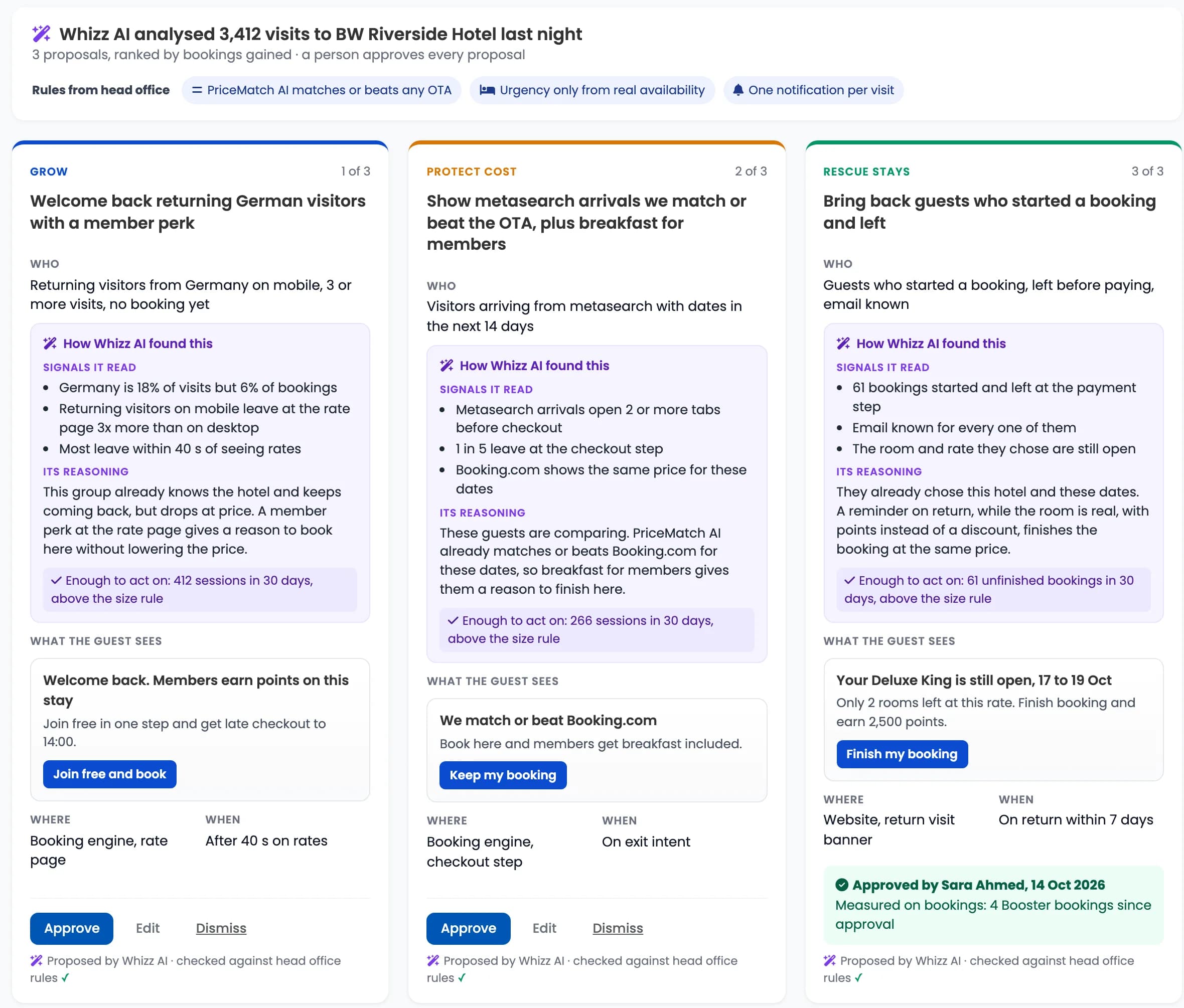
Whizz AI analysed 3,412 visits to BW Riverside Hotel last night
3 suggestions, ranked by bookings gained. You choose what goes live.
Rules from head office
- PriceMatch AI matches or beats any OTA
- Urgency only from real availability
- One notification per visit
Segments below the size rule are ignored. Nothing is proposed on a sample too small to measure.
Booking attribution is claimed only where an engine capture is in place.
The connected advantage
Booster chooses how the advantage reaches the visitor
Loyalty gives the member benefit, PriceMatch AI the price advantage, the booking engine the availability and the context, and the CRM the recognised guest. Booster orchestrates how they reach the visitor. Start with your own website and booking engine, and add the rest when you want it.
Level 1
On your existing website and booking engine
- One tag on your website. Nothing is replaced.
- Banners and pop-ups, targeted by source, device, page, country, dates and exit intent.
- Whizz AI suggestions from your website data. You choose what goes live.
- Impressions and clicks tracked. Bookings counted where the booking confirmation is captured.
Level 2
With the full BookingWhizz platform
- Everything in level 1, and notifications inside the booking steps.
- Members recognised, with their points and perks in the message.
- A saved search resumed against live availability.
- Follow-up to a guest who left, on the channel they agreed to.
- Bookings captured directly, so the measurement does not depend on a separate connection.
| Comes from | What Booster gets | Connection needed |
|---|---|---|
| Booking engine | Live availability, the saved search and the room the guest chose. | The BookingWhizz Booking Engine. On another engine, the website tag and its booking confirmation. |
| WhizzLoyalty | The member benefit, the points balance and who is eligible. | WhizzLoyalty connected to the site. |
| PriceMatch AI | The price advantage: a rate that matches or beats any OTA. | PriceMatch AI on the BookingWhizz Booking Engine. |
| WhizzCRM | The recognised guest and a follow-up on a channel the guest has agreed to. | WhizzCRM connected, with consent held on the guest record. |
See WhizzLoyalty, PriceMatch AI and WhizzCRM.
Three situations
A signal, a notification you chose, a measured outcome
- 1
A visitor comparing prices
- Signal
- On BW Riverside Hotel’s rate page for over a minute, with no action and switching away from the tab.
- Notification
- The direct advantage on the page: member rate, free cancellation and breakfast included.
- Measured
- Impression, click and booking tracked back to the notification, against a control group who did not see it.
- 2
A recognised member
- Signal
- Signed in, with a points balance, looking at a room for the same dates.
- Notification
- Their member benefits, with the points they earn by booking direct.
- Measured
- Member bookings through the notification, measured against members who did not see it.
- 3
A returning visitor
- Signal
- Left at payment last time, and is back on the site.
- Notification
- Back to the room and dates they chose, with availability rechecked now.
- Measured
- Bookings recovered through the notification, counted where the booking confirmation is captured.
Measured
Measured against a control group, on bookings
Every notification is tracked from impression to click to booking, wherever the booking engine’s confirmation is captured. A test runs against a control group, a share of visitors who do not see it, so the result is the additional bookings and revenue, set against the incentive cost, not clicks alone. Each test needs a minimum sample before it is judged, and time alone does not prove uplift.
The screen below sets Booster bookings and revenue beside the hotel’s total and its target. Whizz AI ranks its next proposal on the same numbers.

The types
Ten notifications, four jobs
Each type does a different job. You run the ones that suit your market.
Social proof
What is happening at the property, and what guests have said about it.
- Most recent booking
- OTA reviews
Smart triggers
Respond to the dates and the demand the visitor is looking at.
- Booking urgency
- High traffic
Boosters
Answer the visitor you already know something about.
- Saved search
- Longer stays
- Specific periods
- Specific days
Promotions
Put the offer in front of them while they are deciding.
- Promotion
- Flash offer
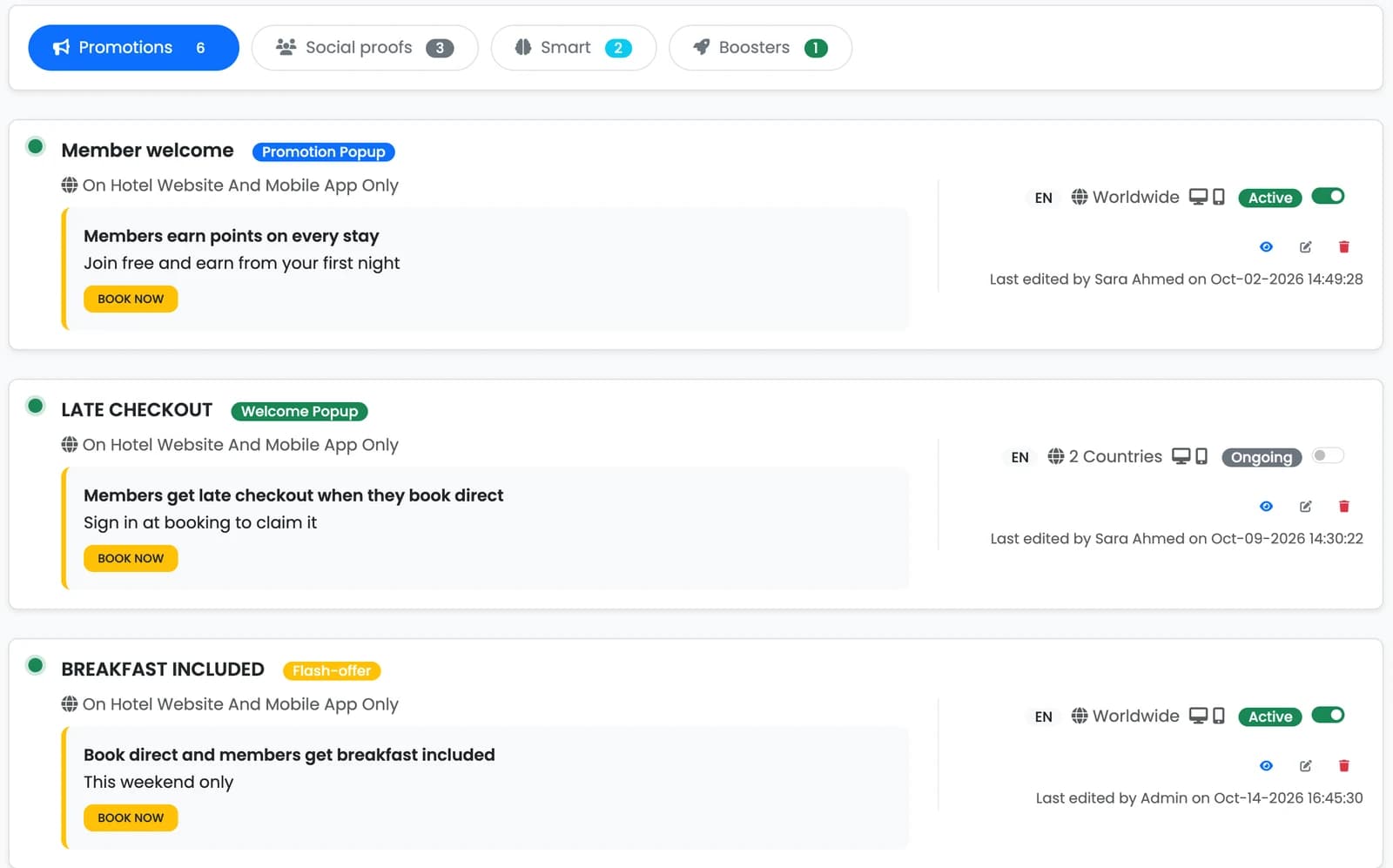
Swipe to see the whole screen.
What the guest sees
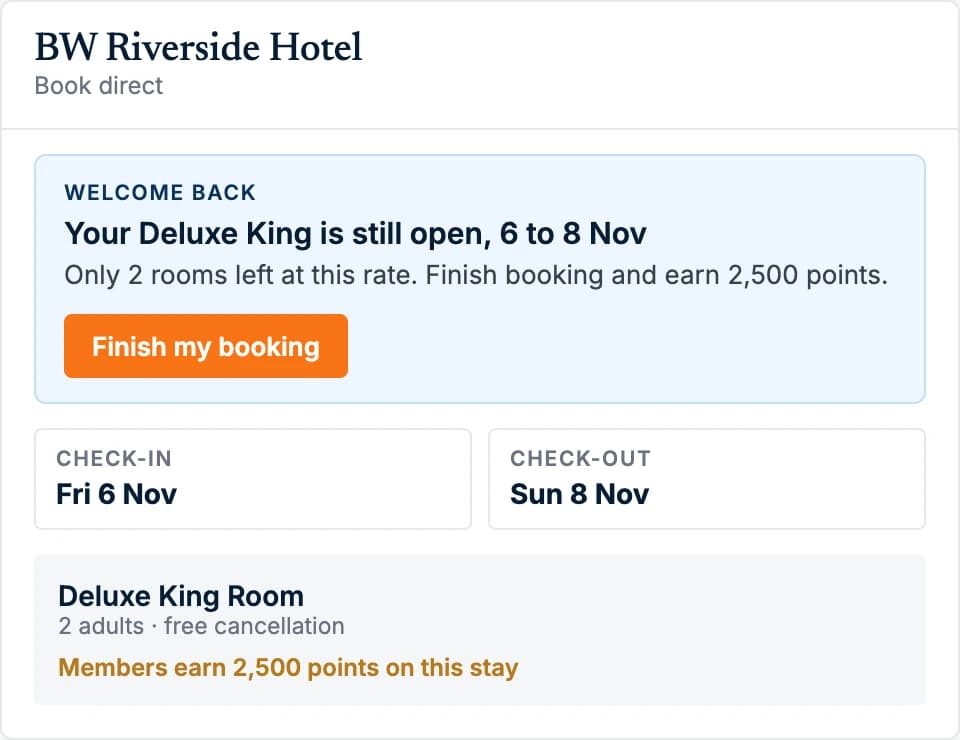
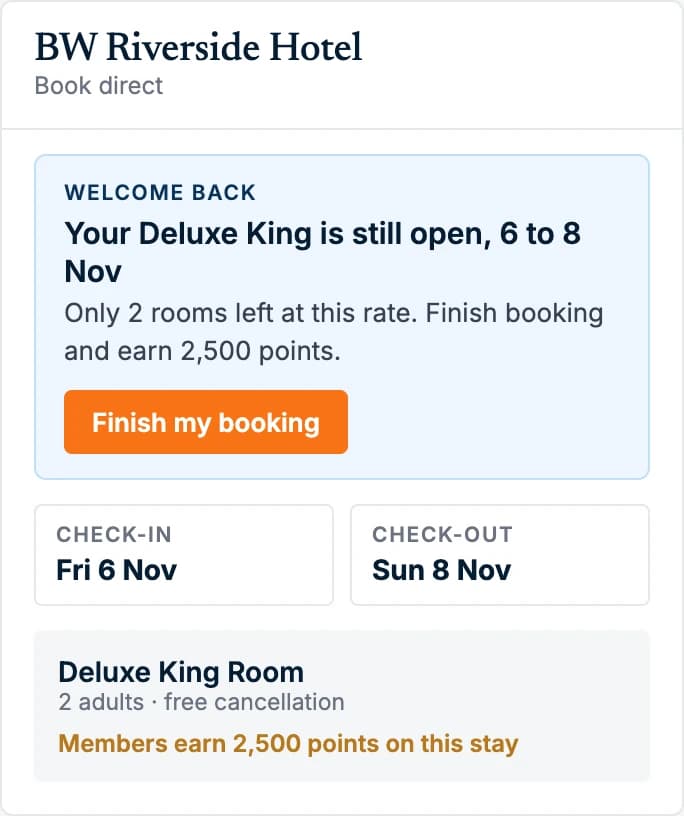
Back to the room they chose.
A returning guest sees the room and dates they left, how few rooms are left at that rate and the points they earn by finishing.
On the page
What your guest sees, on your website and inside your booking engine
BOOKINGWHIZZ
RIVERSIDE
Riverside Garden Suite
Your stay
12 to 15 May · 2 guests
USD 1,020
Continue
Before you go
Your selected dates are still here. Join the programme to see whether a member rate is available for this booking.
Exit intent
Say something useful on the way out
A focused panel appears as the visitor moves to leave a booking page.
BOOKINGWHIZZ
RIVERSIDE
Riverside Garden Suite
Garden Suite
River view · 42m² · Breakfast included
USD 340
Terrace Room
Courtyard view · 28m²
USD 246
A recent guest booked the Garden Suite
Most recent booking
Show recent booking activity
One of the two social proof types, alongside reviews from the channels guests already read.
BOOKINGWHIZZ
RIVERSIDE
Riverside Garden Suite
Garden Suite
River view · 42m² · Breakfast included
USD 340
Terrace Room
Courtyard view · 28m²
USD 246
Selected dates
Midweek at BW Riverside Hotel
Sunday to Wednesday, on the dates you choose.
Flash offer
A real window, on the dates you choose
Set the period, the days of the week and the blockout dates. Shoulder seasons, midweek gaps, a quiet fortnight in the calendar.
Loyalty sign-up
Join in one action. The member rate is the reason.
The same overlay that answers a hesitating visitor captures a member. The visitor who does not book today is still someone you can recognise next time, and the one who does book sees what membership is worth before paying.
BOOKINGWHIZZ
RIVERSIDE
Garden Suite
River view · 42m² · 14 to 16 Oct
USD 340 a night
Member rate shown after joining
Terrace Room
Courtyard view · 28m²
USD 246
Riverside Rewards
Join free to see the member rate for the Garden Suite
Points on every stay, breakfast, late checkout.
Before
One field, one action
Shown on the pages where a guest is still deciding. An email address is enough; the profile fills in as they book.
BOOKINGWHIZZ
RIVERSIDE
Garden Suite
River view · 42m² · 14 to 16 Oct
USD 340 a night
Your member rate
USD 340 a night
- Earns points on this stay
- Breakfast included
- Late checkout to 14:00
- Free cancellation
After
The member rate, revealed
The rate matches or beats the OTA. What the member also gets is points, breakfast and late checkout, which no parity clause governs. Next visit, the page recognises them without asking.
Abandoned booking
The guest who picked a room and left has told you exactly what they want
A reminder alone gives the guest no new reason to come back. Because the cart, the guest profile and the loyalty balance are one system, your message knows who left, what they were shown and what they are entitled to. When the guest returns, availability is rechecked, and if the saved rate has changed or is no longer open they see the current one.
1. The guest leavesAt payment. Dates and room recorded, nothing reserved.
Booking engineBW Riverside Hotel
Garden Suite · 14 to 16 Oct · 2 nights · 2 guests
Member rate, 2 nightsUSD 680Silver member1.5x pointsIncludedBreakfast, late checkoutkarim@example.comCard numberPay and confirmTab closed at 21:14
2. The message that knows who left
On the channel the guest consented to. Email through WhizzCRM where that is the consent held.
BW Riverside Hotel
online
Today
Hi Karim, your Garden Suite is still available.
14 to 16 October, 2 nights, USD 680.
As a Silver member you earn 1.5x points on this stay, with breakfast included and late checkout to 14:00.
Your dates and room are saved. Pick up where you left off.Type a message3. Back to the same bookingThe link opens the booking as it was left.
Booking engineBW Riverside Hotel
Welcome back, Karim. Your booking as you left it.
Garden Suite, 14 to 16 OctUSD 680Points on this stay1.5x, SilverChannelDirectkarim@example.com•••• •••• •••• 4821The room and dates they chose, rechecked against live availability. Nothing to re-enter.
A plain reminder
You left something behind. Here is a link back.
Your message, with Booking Booster and WhizzCRM
Who left, the rate they were shown, the points and perks that come with it, and the booking itself, one tap away. Booking Booster runs the on-site moment; WhizzCRM owns the guest relationship that follows.
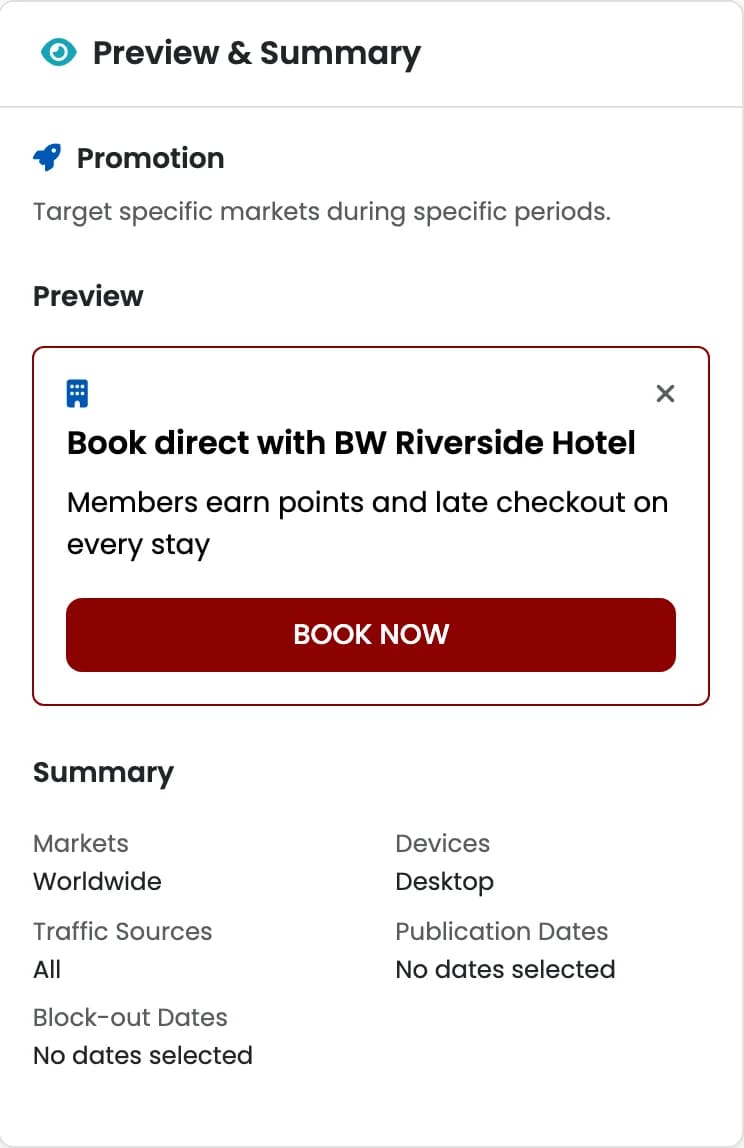
The builder
Write it, target it, see it before it goes live
One page: the notification, who sees it and when, with a live preview beside it. The person who owns the offer builds it, without raising a ticket or waiting for a release.
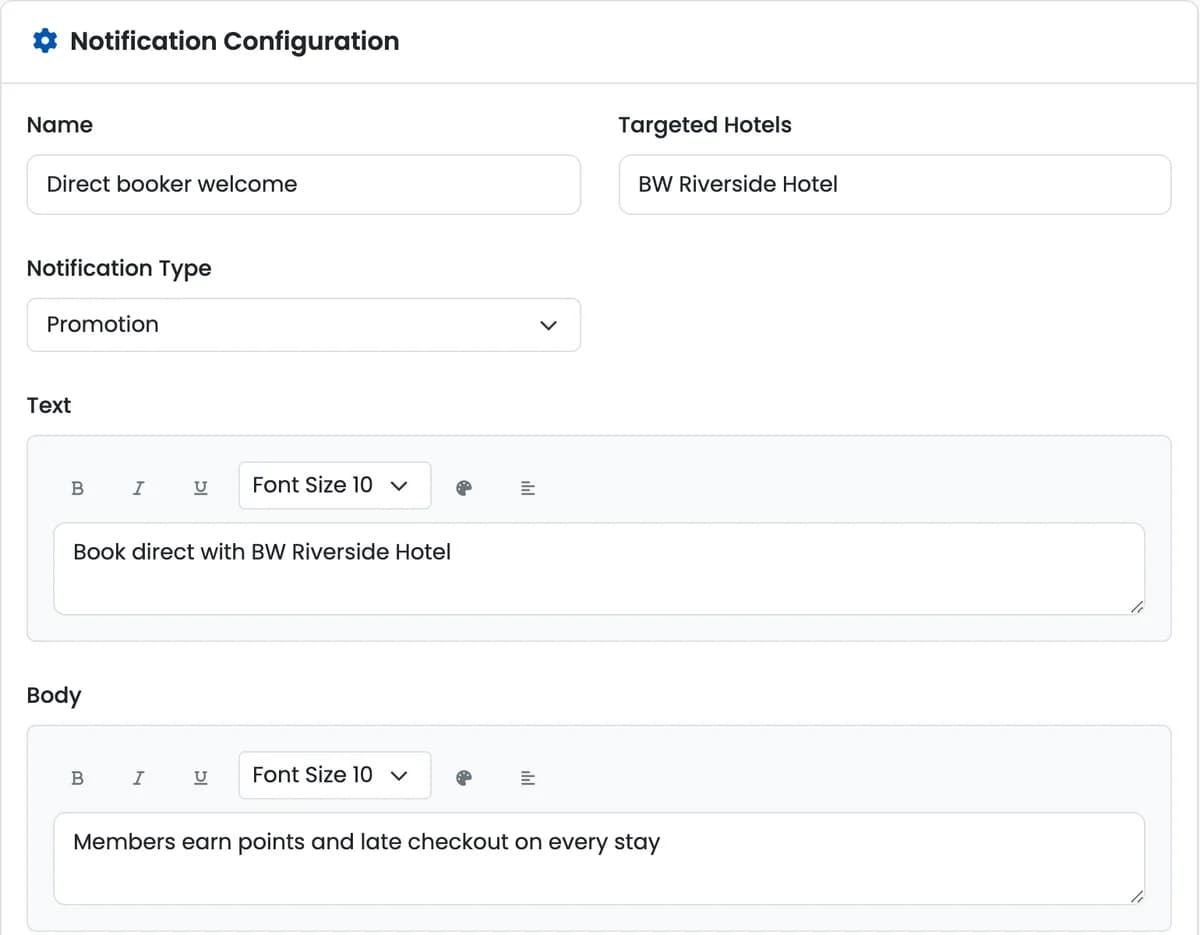
- By traffic source
- By device
- By page
- By country
- By dates
- By weekday
- By schedule
- On exit intent
- With blockout dates
The 30-day trial
How the trial runs, from setup to the decision
The trial starts with a setup call, then the tag goes live. Here is what happens and in which order.
- When the 30 days start
The day the tag is live and the first tracked visit is recorded, not the day you sign up and not the first booking. You get a short email that day with the date the trial ends.
- What install and tracking need
One tag on your existing website. Nothing is replaced.
One line of code on your website, or we add it for you. We also connect booking confirmations so every direct booking the Booster helped is counted. We need access to the website, plus the booking engine’s confirmation page or its booking feed.
- What is included
Booking Booster, the AI orchestration layer, free for 30 days on every hotel in your group at once. It shows each visitor group the right offer at the right moment, within your rules, and your team chooses which notifications go live.
Weekly results by email during the trial: visitors, Booster views and direct bookings helped.
- What happens after
After the trial, Booking Booster continues on its standard terms, with a group arrangement for groups.
At the end of 30 days you see the results and decide. Nothing continues without your yes, and there is no card needed to start.
- Hotels with low traffic
We check your website traffic first, so the trial shows you something real. Where traffic is too low for 30 days to show a clear result, we say so up front and suggest starting with the website or booking-engine route instead.
- If 30 days is not enough evidence
Time alone does not prove uplift. Every test has a minimum sample size, and we say so if it has not been reached.
We extend once, by up to 30 more days, free, so the decision is made on real numbers.
Questions
What hoteliers ask about Booking Booster first.
What does Whizz AI actually do?
It works as an orchestration layer over your website and booking engine. Whizz AI groups your visitors by where they came from, what they browse on and how they book, ranks each group by the bookings it could add, and proposes the notification for it.
Does it work if we keep our current booking engine?
Yes. Booster runs on the hotel’s website with one tag, and nothing is replaced. Bookings are counted where the booking engine’s confirmation is captured. On the BookingWhizz Booking Engine it also runs inside the booking steps, and with loyalty, PriceMatch AI and the CRM connected it can bring members, the price advantage and follow-up into the notification.
Will it discount our rooms?
Not by default. Most of what Whizz AI proposes carries no discount: removing friction on the rate page, or recognising members with points and perks. A discount is only ever proposed as a capped test, inside the limit head office set, on a weak group of visitors with real volume.
How do we know it is working?
Every notification is tracked from impression to click to booking, where the booking engine’s confirmation is captured. A test runs against a control group, a share of visitors who do not see it. Each test needs a minimum sample size before it is judged, so it is kept or stopped on the result only once the evidence is enough. If 30 days do not give enough, we say so: time alone does not prove uplift.
Does it show fake urgency?
No. Availability and social-proof messages appear only when the data behind them supports it. Availability is recorded as a yes or a no for the search the visitor made, so a notification never claims what the property cannot see.
Works with your existing hotel technology
230+ integrations across PMS, payments and Google

















Try Booking Booster free for 30 days
Set up on your own website and booking engine, for every hotel in your group at once.